For firearm, suppressor and precision machine shops

Serial numbers, heat lots, and real job cost, on one ledger nobody can edit

Track every serialized unit from raw bar stock to a finished, roll-marked part, with its heat lot and mill cert behind it. The ledger only adds to itself, so the record holds up when a customer or an auditor asks where a part came from.

$2,500 deployment, then $1,000 a month  ·  14 days free once you’re live  ·  We set you up
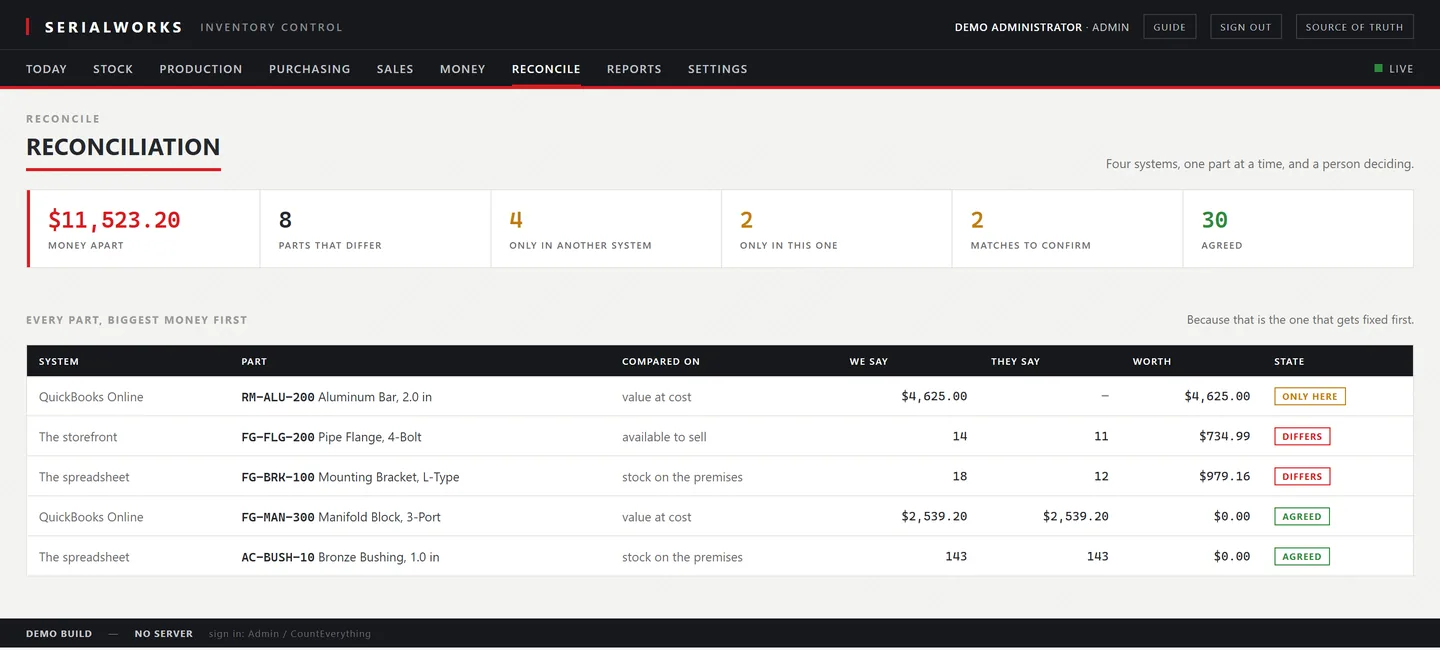
The reconciliation screen: the spreadsheet, QuickBooks, the storefront and the ledger compared side by side, each source named against the figure it should match, with the differences queued to clear.
Drag the picture sideways to read it

In production today

In production on the shop floor — stock, serials, heat-lot traceability, job costs and the books, in one system built for machine shops in the firearms and suppressor industry.

Priced in the open

A one-time $2,500 deployment, then $1,000 a month or $10,000 a year. No per-seat charge, no module upsell, no quote to sit through.

Your data stays yours

Every screen exports to CSV, and a full database dump is yours on request, on any day.

1 searchLists every unit and every shelf a heat lot reached
1 dayFrom your spreadsheet to labels printed on your shelves
0Ledger rows anybody can edit or delete, including us
$1,000A month, US-based support and an account manager built in
01
What it does

Your count is wrong and nobody knows when it went wrong

Most shops run inventory in a spreadsheet and costing in someone's head. It works until a customer asks which heat lot went into a part, or the accountant asks why the balance sheet and the shelf disagree by four thousand dollars.

One ledger. No edits.

Nobody edits history

The ledger is append-only. A correction is a new entry with a name and a reason on it, not an overwrite. When the numbers move you can see who moved them and why.

Serial and heat, tracked

Every numbered unit carries its lot and its mill cert. Ask where a unit is and where it has been and get an answer in one query, not an afternoon in the filing cabinet.

Costs that are real

Machine rates by department, setup spread across the run, tooling per part. Not one blended overhead number that makes hand work look expensive and machine work look free.

02
On the floor

A phone, a sticker, and no signal

The scanner is a web page. It installs from the browser on an Android handset, no app store and no device management. Camera scanning is Android; on an iPhone the same page works by tapping and typing.

No signal. Keep scanning.
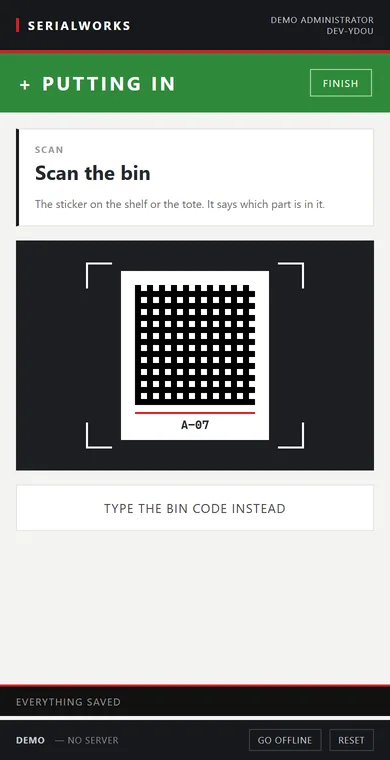
The floor scanner on a phone: a put-away task open, prompting the worker to scan the bin before stock goes in.
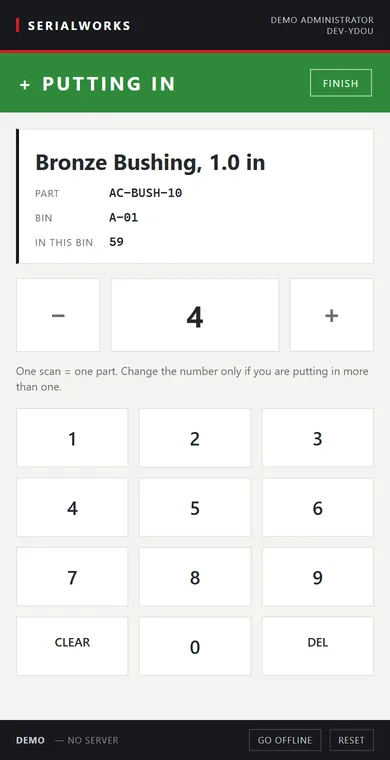
The floor scanner on a phone: a scanned part shown with its code and bin, and a keypad to confirm the quantity.
  • Scans are saved on the handset first, then sent
  • The queue drains exactly once when signal returns
  • The screen says what it does not know, instead of guessing
  • One scan is one movement, and it cannot half happen
  • Every movement carries the name of the person who made it
  • Counts need a second name before they post
03
What a part costs

The total, and the lines that produced it

Material, machine time, labor, tooling and overhead, per unit, for the run size you were actually asked to quote. Setup is charged once per run, so the run size is most of the answer.

Material. Machine. Overhead.
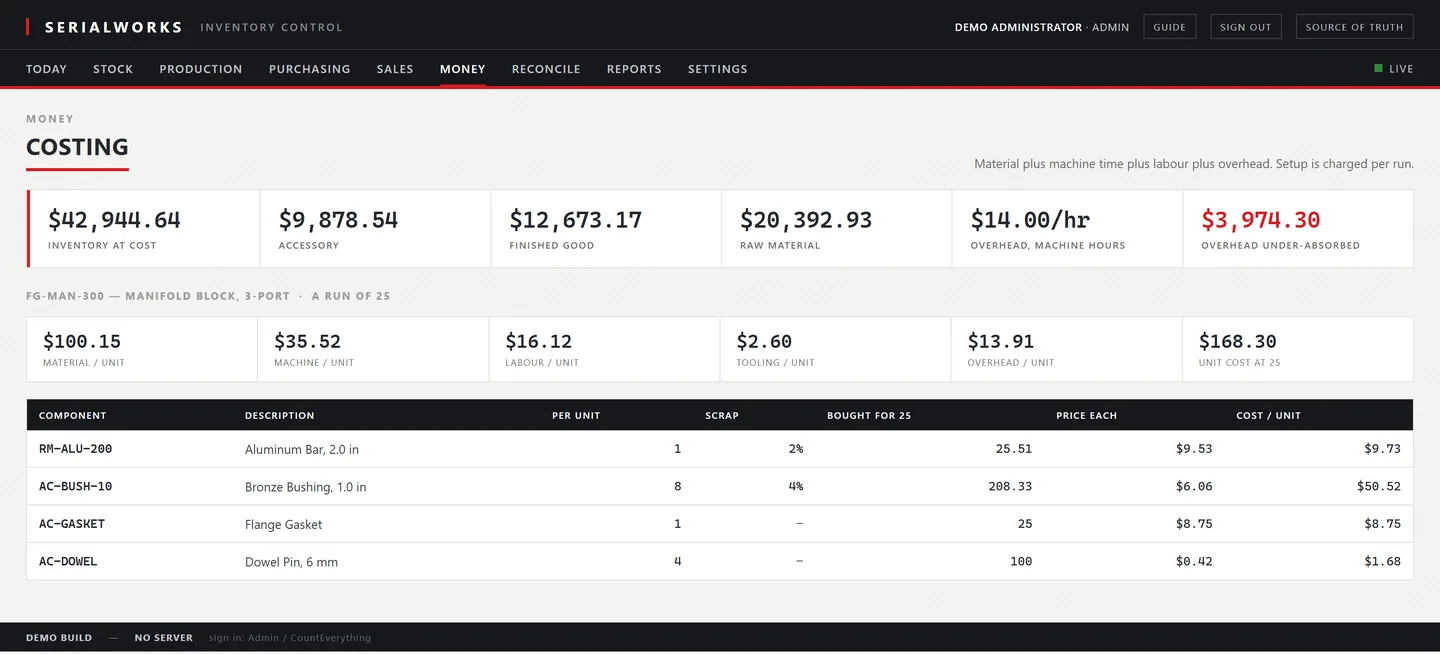
The costing screen: a production run with its unit cost broken into material, machine time, labor, tooling and overhead, above the component and routing tables that build the number.
Drag the picture sideways to read it
04
Where the metal went

A vendor says a heat is bad. Now what

Type the heat number off the mill cert. It follows the metal forward through every build it went into, including through a blank that went into a finished unit, and lists the serials that contain it and what is still on the shelf.

One search. Every unit.
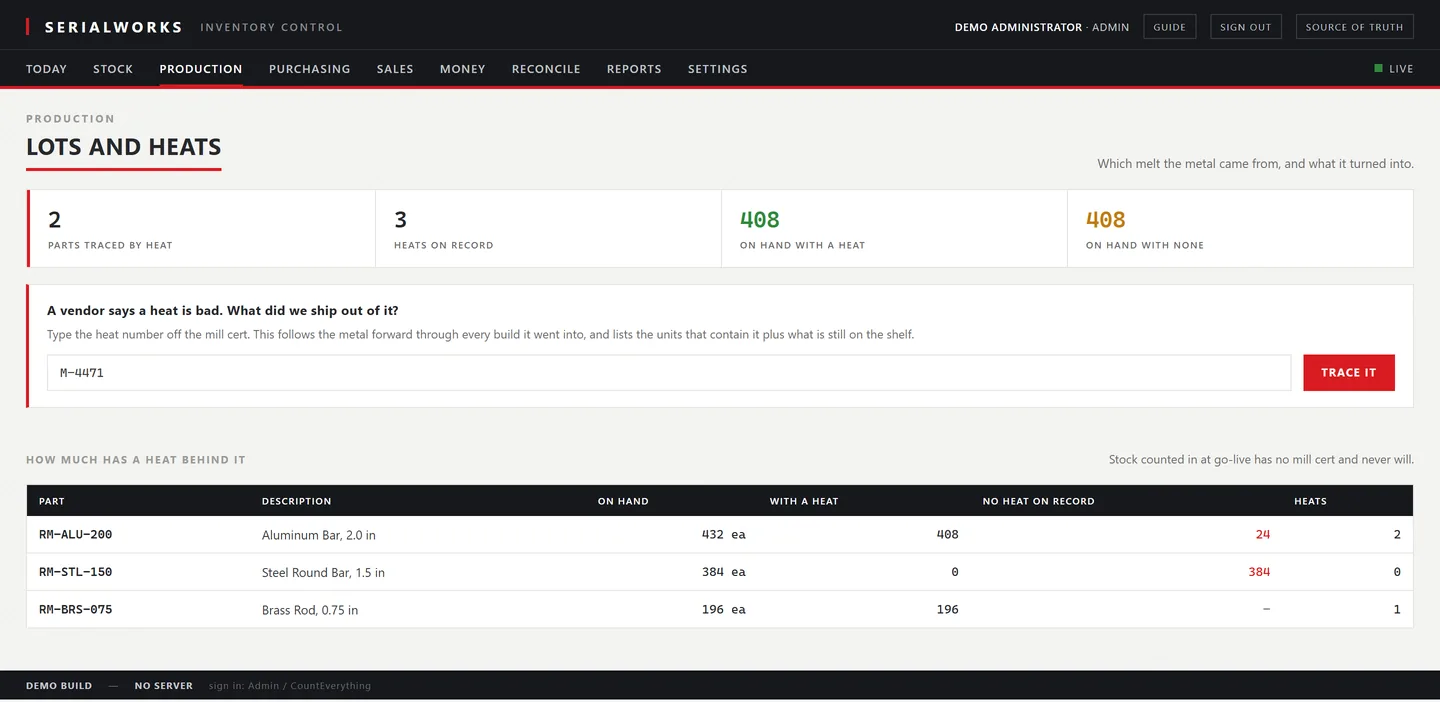
The lots and heats screen: a material heat traced across the shop, showing how much remains on the shelf and which bins and buildings hold it.
Drag the picture sideways to read it
05
How it proves it

Every number traces back to the event that made it

Software that reports its own success will eventually lie to you. This is built the other way round. No screen states an outcome it did not read back from the record, and where it cannot read it back, it says so.

Read it back.
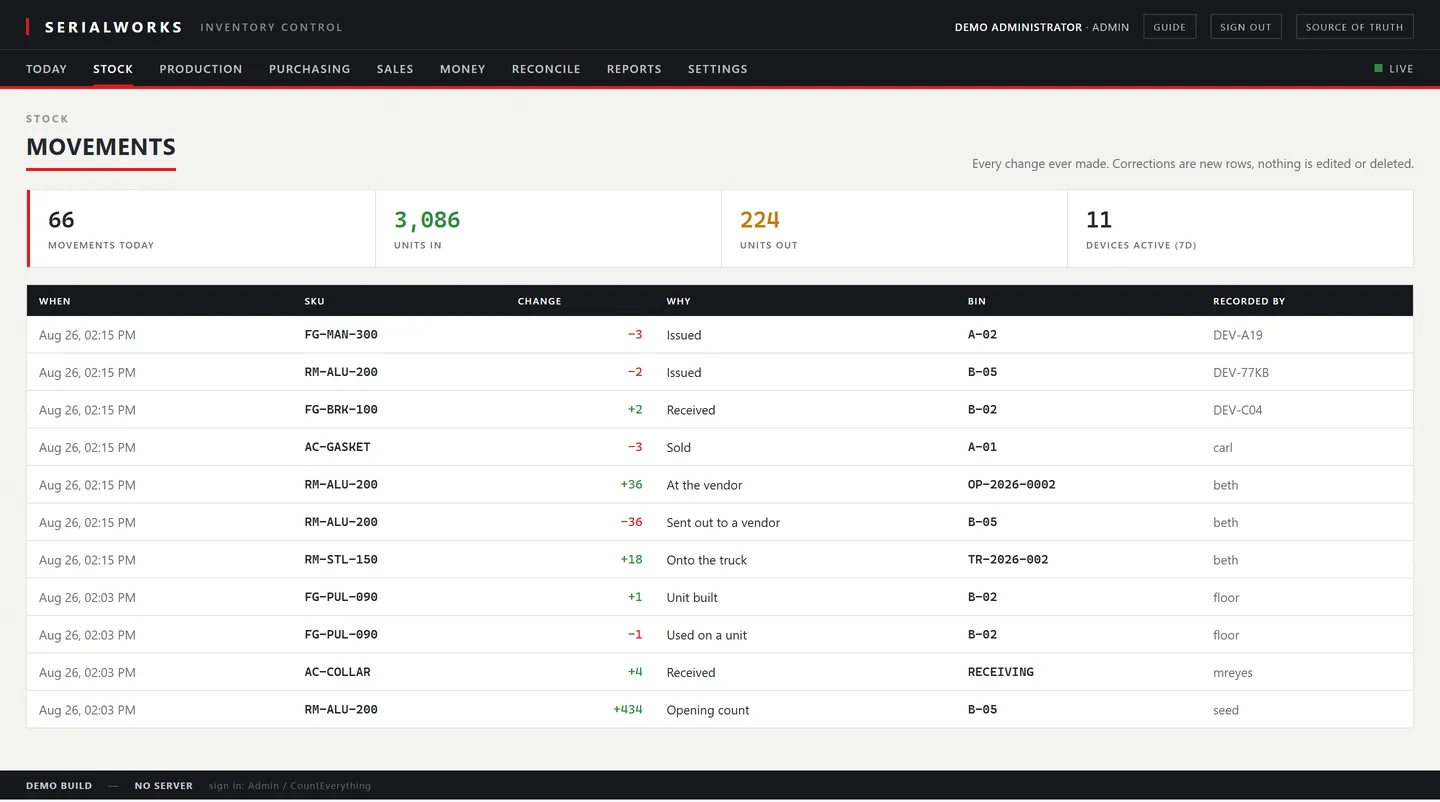
The movements screen: every posting in the ledger with time, part, change, reason, bin and who recorded it, under a line noting corrections are new rows and nothing is edited or deleted.
Drag the picture sideways to read it

What that buys you

The books tie to the shelf. A receipt at an invoice price is valued at that price in the ledger, in the bookkeeper's export, and in the entry that reaches QuickBooks. It's the same number in all three, and it stays that way.

  • Append-only ledger with maintained balances
  • Serial number and heat lot genealogy
  • Two-tier overhead absorption and margin pricing
  • Bills of material, routings and work orders
  • Purchasing, receiving and landed cost
  • Barcode scanner that works with the network down
  • Cycle counts that need two names on them
  • Period close that refuses backdated postings
  • QuickBooks Online, WooCommerce, and custom connectors for any REST API or webhook
  • Nightly backups you can restore and verify
  • CSV export of every screen, and a full database dump on request
06
Pricing

A one-time setup, then one subscription.

A $2,500 deployment gets your shop live on your own parts and your own numbers. After that it's $1,000 a month, or $10,000 a year with two months on us. The first 14 days are free, and they start once you’re live, so you spend them running your real inventory, not a canned demo.

$2,500one-time deployment, per shop

We stand the system up for you instead of handing you an empty database:

  • We load your inventory from a spreadsheet: parts, quantities, bins and vendors
  • We set up your buildings, label stock and floor scanners, and tell you which handsets and labels to buy
  • Hands-on onboarding for the desk and the floor, in US business hours
  • You print labels and record real movements the same week
Annual · two months free
$10,000per year

Works out to $833 a month, and saves $2,000 against paying monthly.

  • Unlimited users and scanners
  • Unlimited buildings and bins
  • US-based support and a dedicated account manager
  • Cancel at renewal, no lock-in
Start free trial
Monthly
$1,000per month
  • Everything in the annual plan
  • Unlimited buildings and bins
  • US-based support and a dedicated account manager
  • Cancel any month, no lock-in
Start free trial

What you'll pay: the 14-day trial is free and starts when you do — you're not charged while it runs. We load your data and set up your shop during the trial; the $2,500 deployment is billed once, and the subscription starts after the trial ends. Handsets and label stock are yours to buy, and we tell you exactly which ones work. Your data exports to CSV on the way out.

Questions

Straight answers

Including the ones where the answer is no.

How long does setup take?
A day. You send a spreadsheet of parts and current quantities, we load it, and you print labels the same afternoon.
Does it sync stock back to QuickBooks?
It posts journal entries and bills. It deliberately does not write quantities. QuickBooks can track quantity on hand itself, and the moment it starts, two systems both believe they own your stock, and your reconciliation is a permanent argument. Money goes to QuickBooks. Quantities stay here, on the ledger, and the two tie out on value.
Can it connect to our other systems?
Yes. Beyond the built-in QuickBooks Online and WooCommerce connectors, we build custom connections to any system with a REST API or webhooks, so Serialworks can talk to the tools you already run.
What happens if the network drops on the floor?
The scanner keeps working and queues the scans. When the connection returns it drains the queue exactly once. This is tested, not hoped for.
Who owns the data?
You do. Every screen exports to CSV and you can request a full database dump whenever you want one.
What happens to my data if I ever leave?
You take it with you. Every screen exports to CSV, and a full dump of the database is yours on request, on any day including your last one. It comes out in plain formats that open in a spreadsheet or load into another system, not in a file only this software can read. The nightly backup can be restored and verified, and you can hold a copy yourself.
What does support cost?
Nothing extra. Support is in the $1,000 and in the agreement, not a tier you buy up to. You get real US-based support and a dedicated account manager who knows your shop and reaches out.